
Sim Racing & Flight Sim Performance Guide
Overview
Simulation titles can provide some of the most breathtaking - and demanding experiences you can get in VR. To get them running smoothly on your hardware, there's a variety of tweaks that can be made on the SteamVR, application, and utility level for best results.
Beyond 2e Specific: Dynamic Foveated Rendering
If you have a Beyond 2e, you can access powerful features like Dynamic Foveated Rendering (DFR) to improve your performance in supported titles. Many of the most popular sim options including DCS World, iRacing, and MSFS 2024 support this feature.
By rendering the focused area at full resolution while scaling down the periphery, you can reduce load on your GPU dramatically, leading to considerable performance gains in most situations.
See our official blog posts for more details:
https://store.bigscreenvr.com/blogs/beyond/dynamic-foveated-rendering-with-bigscreen-beyond-2e
https://store.bigscreenvr.com/blogs/beyond/dynamic-foveated-rendering-early-access-setup-guide
When using DFR, ensure that...
The eyetracking window is left open and running, and DFR is enabled
You have the Quadviews OpenXR layer installed and running, for the titles that need it
The "BeyondEyetracking" addon is enabled under SteamVR>Startup>Manage add-ons
DCS World
DFR Implementation Status: Available via Quadviews OpenXR layer
CPU DFR performance impact: Moderate
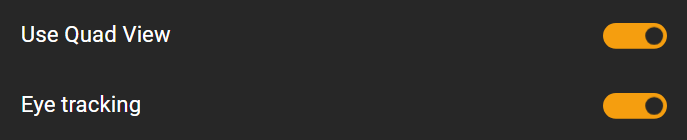
To enable DFR: Enable "Use Quad View" and "Eye tracking" in DCS settings
Useful Resources:
For a complete guide to optimizing DCS world, this guide provides a comprehensive overview:
https://www.8492sqdn.net/guides/dcs/performance/
iRacing
DFR Implementation Status: Native through NVIDIA VRWorks (SPS). NVIDIA GPUs only.
CPU DFR performance impact: Low
To enable DFR:
Useful Resources:
The Virtual Reality section of the iRacing forum
MSFS 2024
DFR Implementation Status: Native through Multi-View Rendering. Works on NVIDIA and AMD GPUs
CPU DFR performance impact: Moderate
Note: MSFS 2024 is a very CPU intensive title. If your CPU is bottlenecking performance, DFR will increase that load.
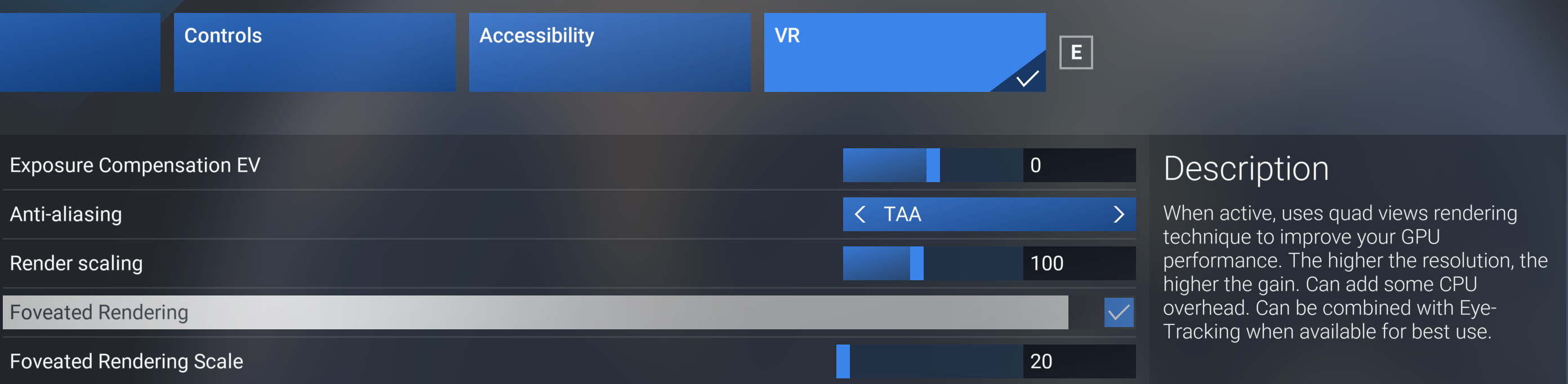
To Enable DFR: Enable "Foveated Rendering" in VR settings. Adjust "Foveated Rendering Scale" as desired (lower will increase performance, but decrease the size of the central focus area)
Useful Resources:
VR Flight Sim Guy publishes regular performance guides, at the time of writing this article the latest was published on January 1st, 2026: https://www.youtube.com/watch?v=I9S00G8Ovk8
Star Citizen
A VR performance optimization guide from the Star Citizen community is available here: