
You're experiencing excess blur, eyestrain, glare, or discomfort
Overview
The Beyond is like a tailored suit - it's designed to fit you precisely, to ensure you look your best. Sometimes it doesn't quite feel right, and needs a little adjustment for maximum comfort.
We try to ensure everyone gets the best experience out of the box. But if you're experiencing blurry lenses, difficulty focusing, eyestrain, excess glare, or discomfort from the cushion, we're here to get that sorted out as quickly as possible.
To help get this process completed efficiently, completing the checks and tests below and then contacting us with the results will give us the data we need to proceed! Thank you.
Checking your Beyond's IPD setting
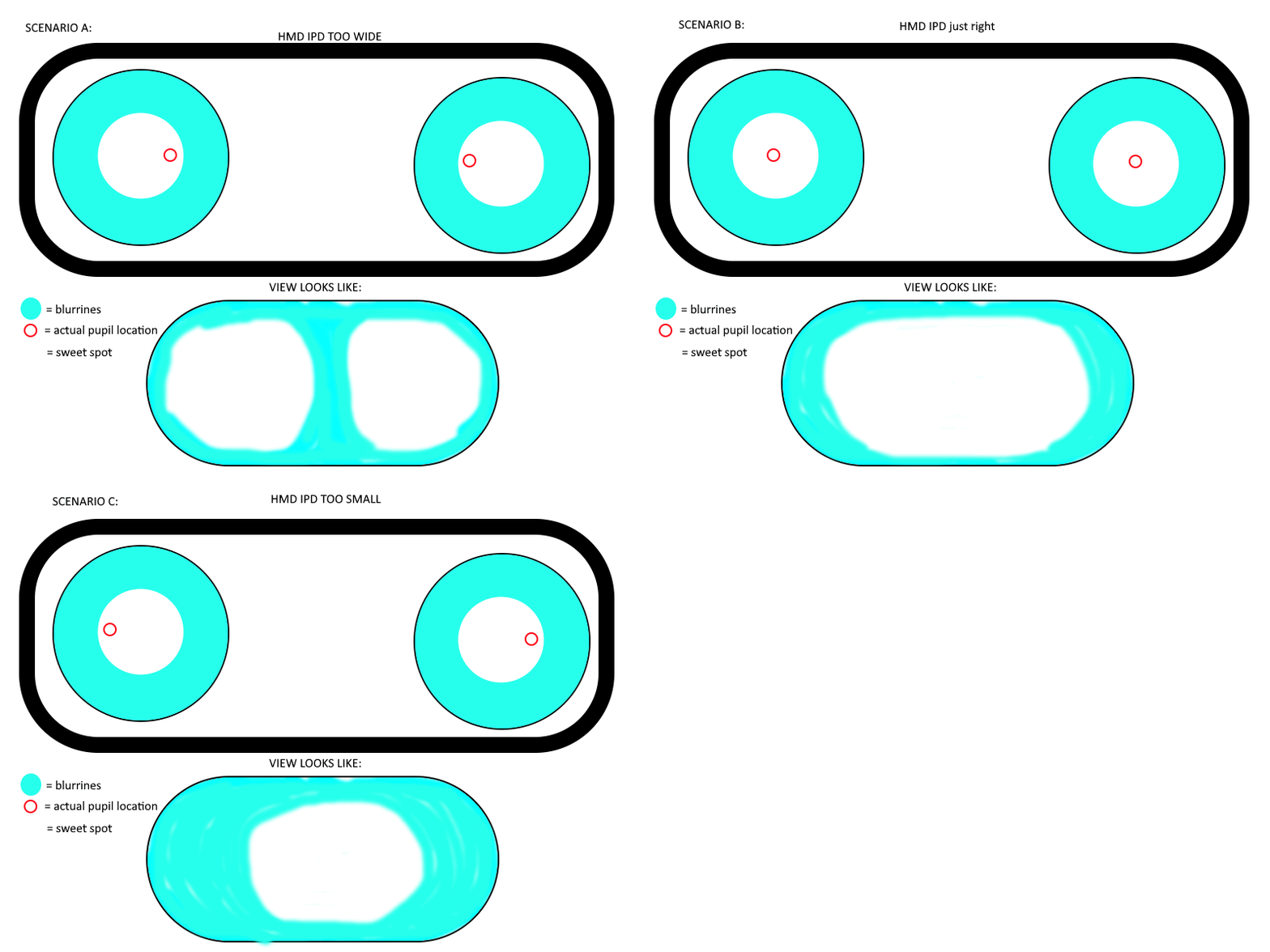
If you're experiencing blur, or difficulty focusing on close-up objects, a common culprit is your headset's IPD not fitting quite right! This is the distance between each lens on the headset itself.
To help find out if an IPD adjustment is required, we have a quick test and a couple questions!
Example behavior GIF:
Quick IPD Test
Please follow these steps:
While you have the Beyond on and SteamVR running, close your right eye.
Using one hand, nudge and hold the headset such that your left eye aligns to the sweet spot of the left optic. The image should be equally clear in all directions.
If you are having difficulty with this, try repeating this step with the face cushion removed.
Within VR, ensure the picture is clear when looking at both something in the distance and something nearby (i.e. your virtual hands or controllers).
Close your left eye and open your right eye.
Next, line up your right eye with the sweet spot of the right optic. Did you:
A move the headset to your left to find the sweet spot in the right optic?
i.e. Did you bring the headset closer to the right side of your nose?B move the headset to your right to find the sweet spot in the right optic?
i.e. Did you bring the headset closer to the left side of your nose?
If the answer was A then the headset IPD is likely too wide.
If the answer was B, then the headset IPD is likely too narrow.
Finally, to help us choose a potential new IPD for you, please provide a bit more information (if you know it):
What is your far IPD as provided by an optometrist? and/or
What IPD have you traditionally used on other headsets?
With Beyond 2, the IPD is adjustable directly via the included IPD tool and IPD setting in the Bigscreen Beyond Utility, as such it's something you can dial in yourself! But with Beyond 1, sending the headset back to us to change the IPD directly is required.
When contacting us, please share these results in detail. This can help us determine the next best steps!
If the result was "A", too wide, there's an additional test you can try to help us determine how far away blur on close-up objects start. The exact distance helps let us know the general range off how far off your IPD is. (i.e the farther away the distance, the farther off the IPD is from where it should be)
Near-object clarity test
Perform the test using your Beyond, while looking at your left controller in the middle of your vision, with both eyes:
Load up a basic environment with controllers (steamVR home, HL:Alyx, whatever you like)
Hold out you right arm in front of you
With your left hand, touch your fingertips, wrist, elbow, and bicep
At what distance does the controller start to become blurry?
Issues related to the custom-fit cushion
If the cushion seems uncomfortable, or isn't positioning the optics in an ideal location that's preventing you from using your Beyond, please contact us. To help the process out, we have some standard checks to help us understand the potential tweaks required:
Quick Cushion Checks
Please answer the following questions:
Where would you describe the most discomfort on your cushion?
Where, if any, would you describe light to be leaking?
When removing the cushion from the headset and looking through the lenses, would you describe the picture quality to have...
Improved?
Worsened?
Or stayed about the same?
May you provide some pictures of your cushion?
Isometric (diagonal)
Straight forward (camera pointing at the side that directly touches the face)
Top-down
Any other pictures you may wish to note
Common issues
I did the quick IPD test, but could not find a sweet spot in either eye
and/or
Edge to edge clarity is extremely narrow, even with the cushion removed and getting as close as possible
If you're having difficulty finding good optical quality from either eye despite manual adjustments, it may be a sign that you need the prescription lens inserts - they can make a very large impact even if your prescription is relatively minor, or if you haven't used them in other VR headsets in the past. See this help article for more information.
My cushion is asymmetric! Is it defective?
If your cushion seems a little offset, the answer is it depends.
Many people have asymmetrical PDs (distances between their nose and their eye) - since the IPD on the Beyond itself is symmetrical, the cushion is designed to offset the headset in these cases to ensure the lenses are lined up correctly.
So, no need to panic at first. But if you've had a chance to wear and use your Beyond and it feels uncomfortable or the lenses aren't lining up, contact us and we'll get things sorted out!
The heat from the Beyond feels uncomfortable
For some users, the custom seal of the Beyond can help make things a little warmer.
A few ways to help mitigate that:
Reducing the brightness of the display and increasing the fan speed inside the utility
External cooling (for the room, or even better a fan pointed directly at you while in VR)
Grabbing some 3x1mm magnets to act as spacers by placing one or more on each section of the cushion - this can help add minor ventilation and break the seal a little.
For more solutions, see the "Community Modifications" section.